- Account Management
Pour suivre le CA et la renta
Search template name | Filtres |
CA hebdo Panier | I. Aller dans Queries- Gross profit II. Soit 1A. Customer groups > Panier client (nom)
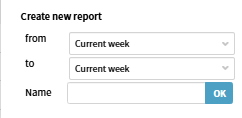
ou Soit (de préférence) à partir de 1 juillet 1B. Additional filters> Other participants > Sales account manager > votre nom III. Dans "Search template": ajouter: from Current week to Current week nommer: CA hebdo Panier
|
CA mensuel panier | I. Aller dans Queries- Gross profit II. 1A. Customer groups > Panier client (nom)
ou (de préférence) 1B. Additional filters> Other participants > Sales account manager > votre nom III. Dans "Search template": ajouter: from Current month to Current month nommer: CA mensuel Panier |
Renta |


2. Project Management
Search template name | Filtres |
CA AJD | I. Aller dans Queries- Gross profit II.. Dans "Search template": ajouter: from Today to Today nommer: CA AJD |
CA hebdomadaire | I. Aller dans Queries- Gross profit 1A. Customer groups > Panier client (nom)
ou (de préférence) 1B. Additional filters> Other participants > Sales account manager > votre nom II. Dans "Search template": ajouter: from This week to This week nommer: CA hebdomadaire
|
CA mensuel | I. Aller dans Queries- Gross profit II. Dans "Search template": ajouter: from Current month to Current month nommer: CA mensuel |
CA mensuel par PM | I.Aller dans Queries- Gross profit II. Dans Other participants, choisir Project Manager et votre nom III. Dans "Search template": ajouter: from Current month to Current month nommer: CA (votre nom) mensuel. Par ex: CA Eduardo mensuel Si vous voulez voir aussi le CA mensuel par PM |
